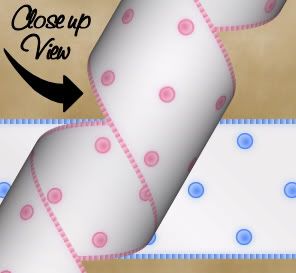
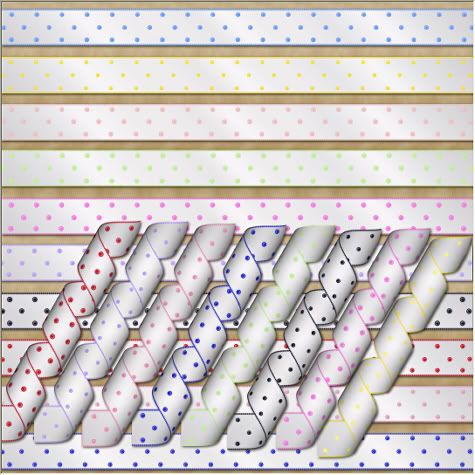
I'm assuming you already have your copy of Paint Shop Pro for this tutorial. You also need Mura's Meisters copies plugin, which you can get Here, and Nanson's mqc snow gradient which you can get at her site Here. Place the gradient in your gradients folder, and the mm copies in your plugins folder.
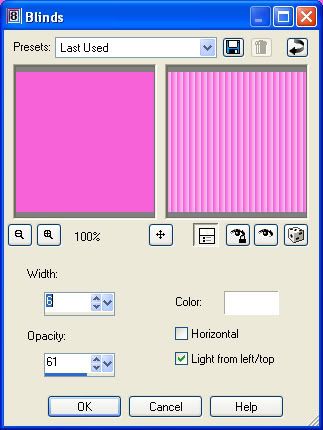
Start by opening a new, transparent image with whatever dimensions you want for your ribbon. Add 10 extra pixels to the width because we are going to crop a little bit off when we are finished. For this tutorial, we are going to be using 1810 x 140. Set your foreground to #F761D9, and fill your transparent layer with this. Go up to the "Effects" tab, and choose "Texture Effects", then choose "Blinds". Put your settings to the following, and click ok.
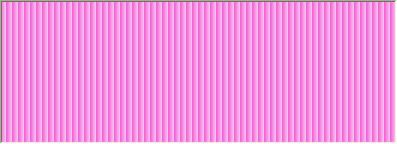
Your solid image should have changed to look like this:
We want just a small corrugated edge surrounding our ribbon, so go up to the "Selections" tab and choose "Select All", "Selections" tab again and choose "Float", "Selections" tab again and choose "Defloat", then back up to the "Selections" tab and choose "Modify", then choose "Contract" and in the number of pixels box choose 5 and hit ok.
Set your foreground to the mqc snow gradient with these settings:
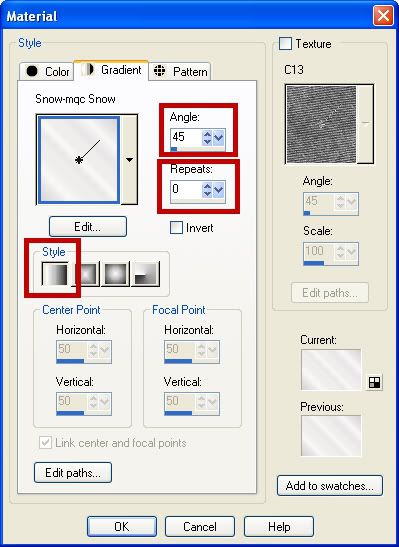
Flood fill your contracted layer with the gradient. Go up to the "Selections" tab and choose "Select None". In your material palette to the right, set your foreground back to our original colour of #F761D9, and your background colour to white. Click on your background again and select the "Gradient" tab and change it to foreground-background, with the following settings:
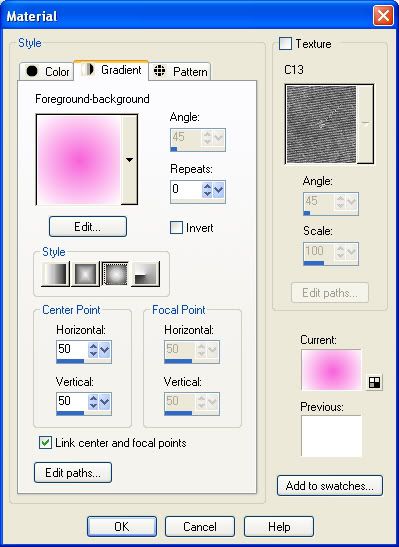
Your materials palette should now look like this:
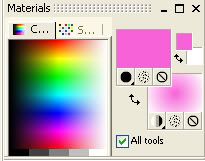
Select your preset shapes tool, and put it at ellipse, Anti-alias checked, Create as vector checked, Line style is solid, and a line width of 1. Hold down your shift key, and draw out a small dot shape on your layer. If satisfied with your dot, In the layer palette, right click on your dot vector layer and choose "Convert to raster layer".
Now, we want this one dot to be perfectly centered on our ribbon, so go up to the "Edit" menu and select "Cut". Then, back up to the "Edit" menu and choose "Paste as new layer". This will center our dot evenly in the middle of our ribbon but on a new layer. Make sure your dot layer is active. Next, go to the "Effects" tab, then to "Plugins" and from the flyout, choose "Mura's Meister" then "Copies". Choose the following settings: (You can play with the spacing of your dot line by increasing or decreasing the digits in the "Number" box.)
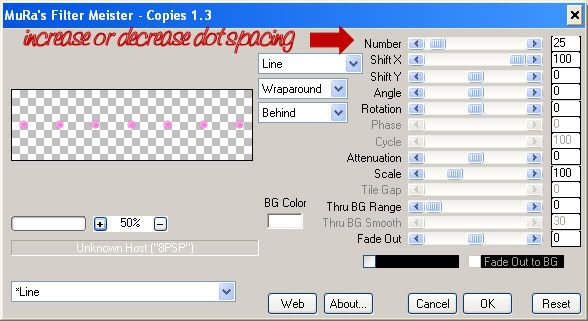
Your image should now have a line of dots from end to end. Select your mover tool and move that line of dots up to the top of the white part of your ribbon. Make sure that line of dots is active, and go to the "Edit" tab, and select "Copy". Go back to the "Edit" tab and select "Paste as new layer" and move that layer down to the bottom of your white ribbon. Make sure the dots are even in line with the top layer. Go back to the "Edit" tab and choose "Paste as new layer" again and move that line to the right and position it so that the dots are staggered between the top and bottom lines.
When satisfied with the placement of your dot lines, in the layer palette to the right, right click on a layer and choose "Merge" then "Merge Visable". I had you add 10 extra pixels to the width of your transparent layer when we first started out because now we are going to crop off the edges for a more realistic look. To finish up, crop a little bit off each of the ends of your image, a bit past the white part like the finished picture below:
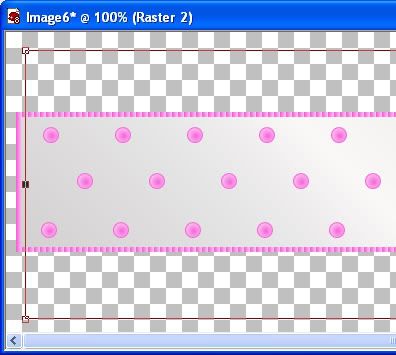
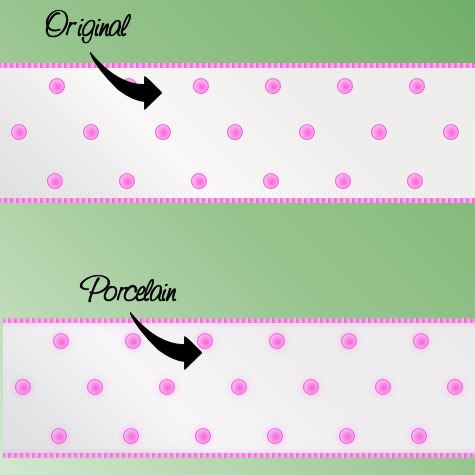
Extra Tip: To give it a little bit of a satin sheen, use the Xero porcelain plugin on the finished ribbon.
TOU:
If you do this tutorial, your end result is yours to do whatever you wish; give it away as a freebie, use it as part of a kit, or sell it for profit. You may not make this into an action or script to give away as a freebie or to sell for a profit. A mention or a link back here would be appreciated but is not mandatory. Please do not share the supplies or tut through email or any other means, send them here to my blog to get the supplies and tut for themselves.
very nice thank you for the tut
ReplyDeleteGreat tutorial, thanks for sharing it!
ReplyDeleteWoW! What a simple tutorial. I loved doing it and your directions were easy to follow. Great job! Thank You so much :)
ReplyDeleteThank you so much. I love learning new things.
ReplyDeleteGreat tutorial....thank you very much :)
ReplyDeleteNo Images for this tutorial :(
ReplyDeleteIf you saved the page in a pdf format, it will show the pictures. There are free pdf writers out there to use. I use PrimoFreePDf.
ReplyDeleteHEYY, FOR SOME REASON I GO TO USE THE PLUG IN AND IT CRASHES :s
ReplyDeleteHowdy! Do you know if they mke any plugins to safeguard
ReplyDeleteagainst hackers? I'm kinda paranoid about losing everything I've worked hard on. Any
suggestions?
Feel free to visit my website ... 7m
20150728 junda
ReplyDeletecoach outlet
ed hardy clothing uk
coach outlet online
ralph lauren uk outlet
gucci sito ufficiale
true religion
kate spade bags
michael kors handbags
christian louboutin shoes
fitflops sale
coach outlet store online
coach outlet store online
air max uk
louis vuitton sacs
kate spade outlet
coach factory outlet
louboutin pas cher
michael kors
pandora charms
nike air force 1
kate spade handbags
ray ban wayfarer
true religion jeans outlet
ed hardy clothing outlet
chanel online shop
ray ban sunglasses
hollister outlet
michael kors outlet
michael kors purse
mcm backpack
gucci handbags
michael kors handbags
louboutin
burberry scarf
oakley sunglasses outlet
tn pas cher
michael kors outlet
pandora charms
ray bans
air jordan uk
lululemon, oakley pas cher, hogan, tn pas cher, new balance pas cher, north face, lacoste pas cher, ray ban uk, michael kors, true religion jeans, hollister pas cher, nike air max, timberland, mulberry, hollister, ray ban pas cher, nike huarache, coach outlet, nike roshe, abercrombie and fitch, converse pas cher, michael kors, air jordan pas cher, true religion jeans, vanessa bruno, nike free run uk, longchamp, longchamp pas cher, michael kors, nike air max, nike air max, nike blazer, nike roshe run, ralph lauren uk, hermes, north face, nike free, burberry, michael kors, sac guess, nike trainers, air max, air force, louboutin pas cher, coach purses, true religion outlet, replica handbags, sac longchamp, true religion jeans, vans pas cher, ralph lauren pas cher
ReplyDeletecanada goose uk, moncler outlet, moncler, canada goose outlet, louis vuitton, louis vuitton, wedding dresses, sac louis vuitton pas cher, links of london, barbour jackets, montre pas cher, lancel, supra shoes, canada goose outlet, canada goose, louis vuitton, pandora jewelry, replica watches, converse outlet, moncler, ugg boots uk, swarovski crystal, bottes ugg, toms shoes, louis vuitton, thomas sabo, pandora charms, canada goose, moncler, juicy couture outlet, ugg,ugg australia,ugg italia, canada goose, ugg pas cher, swarovski, pandora jewelry, doke gabbana outlet, doudoune canada goose, moncler, moncler, ugg,uggs,uggs canada, barbour, marc jacobs, moncler, hollister, canada goose, juicy couture outlet, pandora charms, karen millen, moncler, coach outlet
ReplyDeleteninest123 16.02
roshe run
ReplyDeleteair max 90
curry shoes
kobe shoes
longchamp bags
michael jordan shoes
dior glasses
longchamp
yeezy boost 350 v2
brady jersey
giuseppe zanotti sneakers
ReplyDeletepandora
christian louboutin outlet
moncler online
coach outlet online
tods shoes
moncler outlet
pandora
adidas nmd
coach outlet online
profile1
ReplyDeleteprofile2
profile3
profile4
profile5
profile6
profile7
How to register online slots easily at bookies that are very capable of giving you extraordinary bonuses so that you can get various types of benefits that will be very, very extraordinary, and here you can get the right strategy that will help you get various types of things that you can do. make you richer and more comfortable playing at the online bookies, please click on the link here, good luck http://www.celticdelights.co.uk/
ReplyDelete